Horas - Time zone converter for Windows
| Purpose | World clock and time converter |
|---|---|
| Version | 6.45 |
| Package size | ~6.67MB |
| Platforms | Windows 11/Server 2022 down to 7/2008 R2, 32/64-bit |
| End User license price | $19.95 (major upgrades: $12.95) |
|
Prices in US dollars
|
|




With the world becoming more connected, people are following world events, doing business, talking to family and creating friends internationally. Horas is a world clock that helps you keep track of time in different cities by displaying multiple clocks on your desktop. Horas is packed with useful features and yet, it is very easy to use. Whether you are a professional, a hobbyist or a computer novice, you will find Horas invaluable in helping you stay properly connected to the rest of the world.

Horas takes the confusion and finger counting out of time management with tools including a converter in which you can enter the time in a city and see the corresponding time in the others.
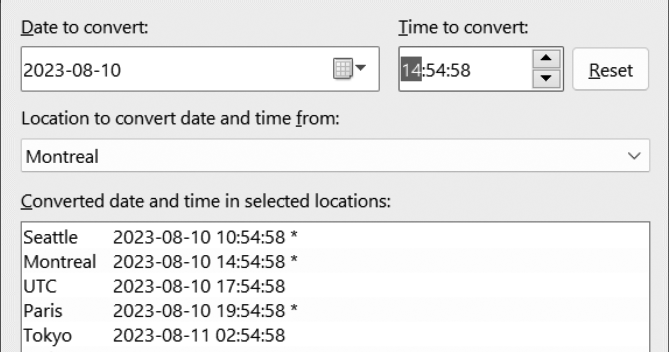
A calendar is included for quick date lookups and calculations. All you need is a click or two to figure out a time duration and a past or future date.

Hot keys enable you to trigger events anytime, even when Horas is hidden. For instance, you can define the F4 key to toggle the Calendar and then, whenever scheduling a meeting or booking a trip with another application, hit the F4 key to display the Calendar and look up dates, then hit the F4 key again to hide it and continue your work.

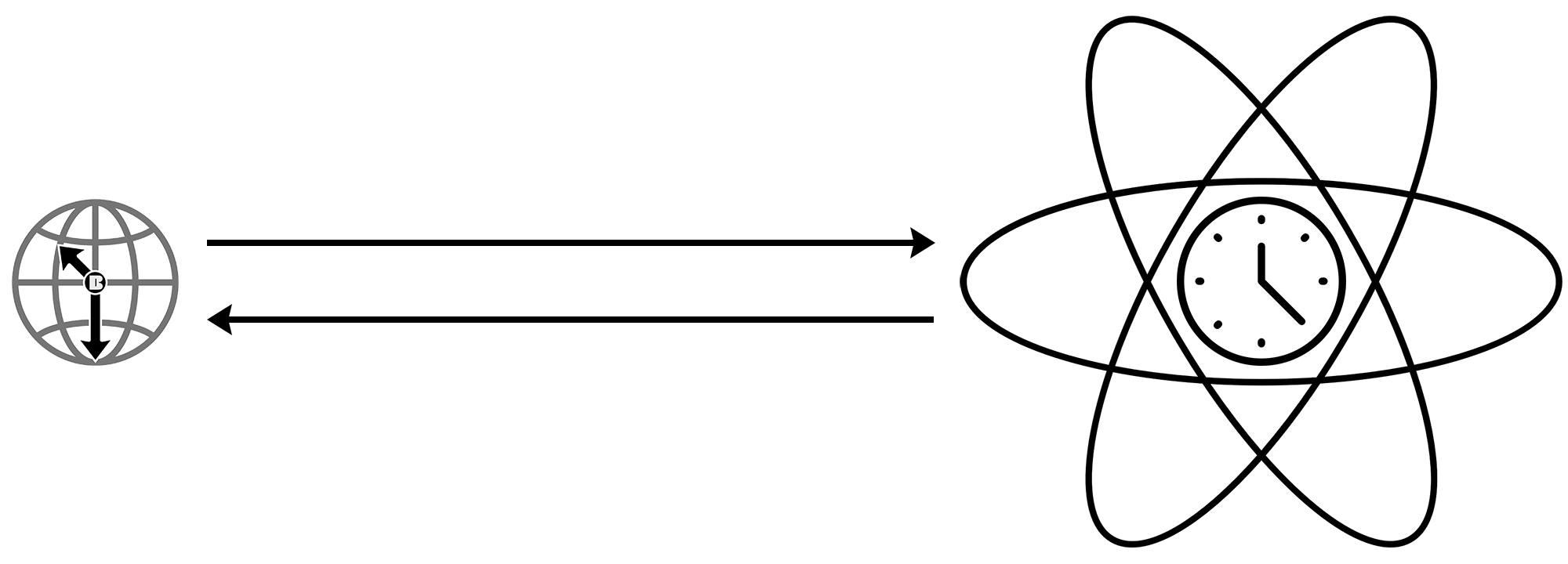
Plus, Horas can automatically adjust your computer clock by synchronizing it with atomic clocks.
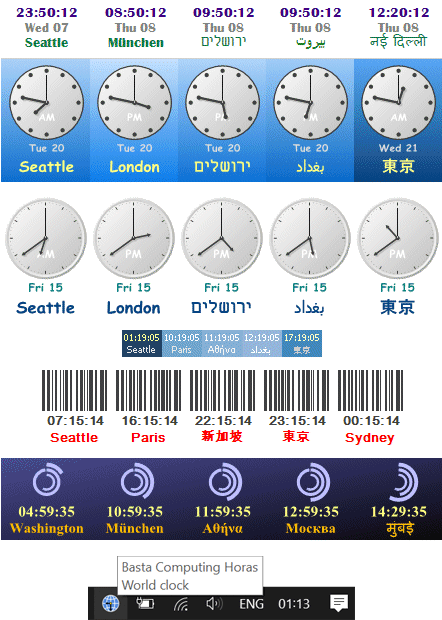
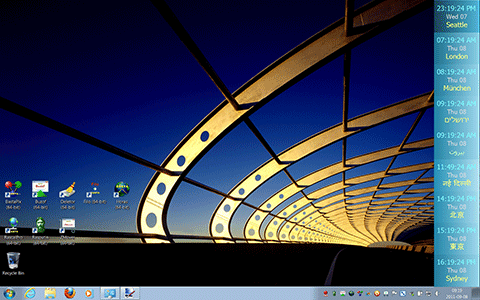
Customize Horas to your needs from the way it looks, to the way it behaves. Time format, daylight saving time, Swatch Internet Time, auto-hide, hot key, data download, clock style, background style, color, font and more... All can be adjusted to fit Horas on your desktop and in your habits.
Try Horas for a few days and see why it's not a JAWC (Just Another World Clock:)
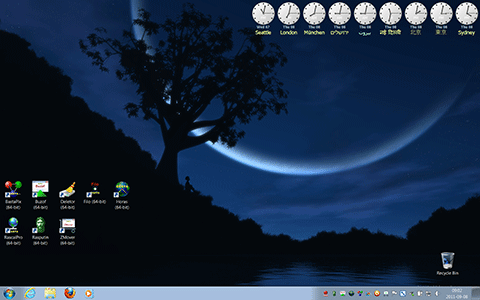
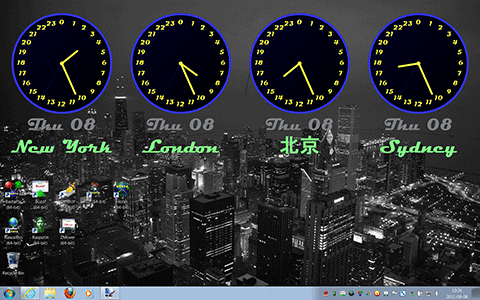
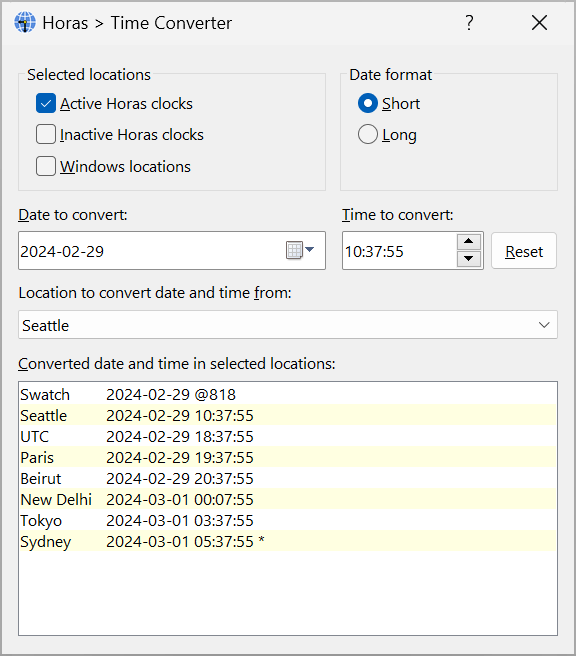
Time converter
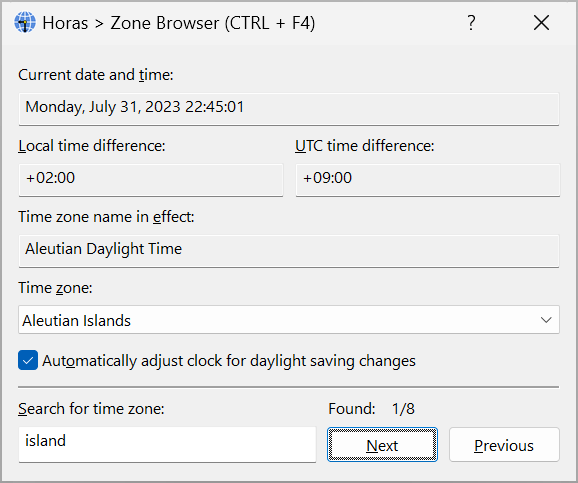
Zone browser
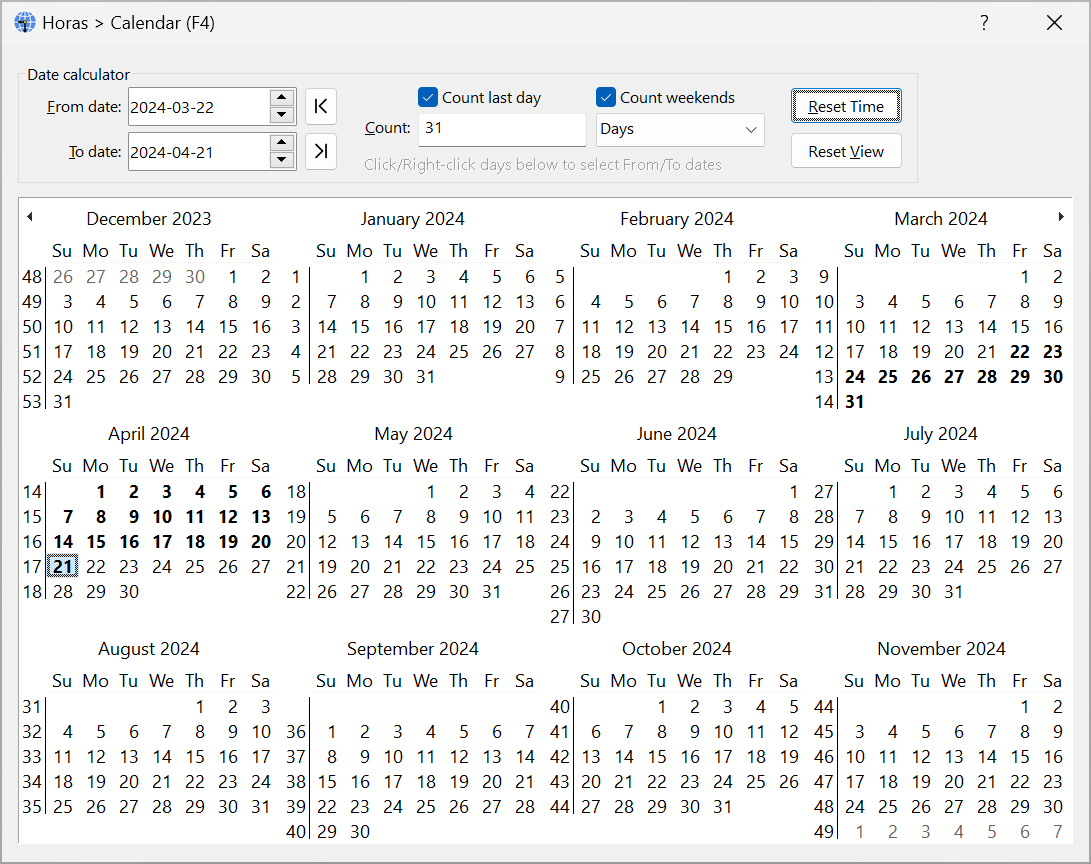
Calendar
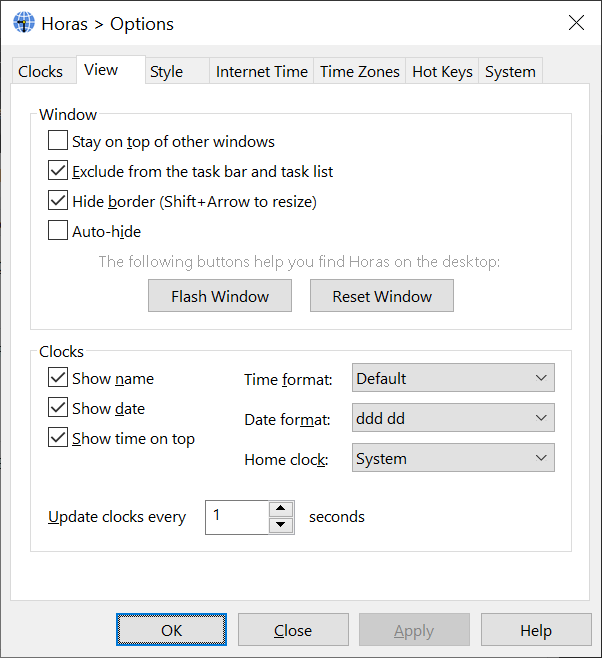
View options

Taskbar corner icon menu
- Time converter.
- Time zone browser.
- Calendar with a time range calculator.
- Hot key support to trigger actions instantly.
- Vertical and horizontal clock alignment.
- Can dock and auto-hide like a toolbar.
- Can stay on top of other application windows.
- Multiple clock styles including analog, digital, roman, barcode, etc.
- Multiple date and time format options.
- Automatic adjustment of your computer clock.
- Automatic adjustment of daylight saving changes.
- Swatch Internet Time support.
- Time zone and server data updating from the Internet.
- Transparent, textured and daylight indication background styles.
- Scalable display to look good at all sizes.
- Simple appearance to economize resource consumption.
- Does not waste desktop or taskbar space.
- Windows regional settings support.
- Foreign language scripts support.
- Compliant until year 10000.
- Technical specifications.
Version 6.45 on 2024-04-10
- Added menu items to move the clocks to predefined positions on the desktop.
- Performed stability and performance improvements.
Version 6.44 on 2023-08-11
- Added a weekend option to the calendar for working days calculations.
- Performed stability and performance improvements.
- Discontinued Windows Vista and Server 2008 R1 compatibility to take advantage of newer Windows features. You can download v6.43 to run Horas on older Windows versions. The new minimum is Windows 7 and Server 2008 R2.
Version 6.43 on 2022-03-04
- Increased the wallpaper size limit.
- Maintenance release.
Version 6.42 on 2020-05-22
- Fixed a time range calculation error in the Calendar's Date calculator.
Version 6.41 on 2020-05-15
- Added an option to count the last day and support for decimal numbers in the Calendar's Date calculator.
- Updated the application icon.
Version 6.40 on 2020-04-01
- Added a backup feature to save and restore application settings.
- Updated the user interface and help guide including better display scaling support.
- Discontinued Windows XP and Server 2003 compatibility to take advantage of newer Windows features. You can download v6.38 to run Horas on Windows XP/2003. The new minimum is Windows Vista and Server 2008.
Version 6.38 on 2018-04-17
- Accommodated the Windows 10 Improved Boot Up Experience feature.
Version 6.37 on 2017-07-14
- Added more date formats.
Version 6.35 on 2015-09-25
- Maintenance release.
Version 6.32 on 2013-06-25
- Updated the software for Windows XP/2003 backward compatibility.
Version 6.31 on 2013-05-23
- Resolved installer issues on 32-bit platforms.
Version 6.3 on 2013-01-08
- Updated the software for Windows 8 compatibility.
Version 6.2 on 2011-09-05
- Added a configurable updater to keep the program up-to-date.
- Improved the Options window interface.
- Improved the installer.
Version 6.1 on 2010-03-08
- Improved the user interface of the hot key options section.
- Forced all but the clocks window to open within the desktop. This prevents Horas windows from opening partially or totally outside the desktop after reducing the display resolution.
- Stopped listing undefined hot keys in the startup notification message.
- Started displaying the startup notification message when Horas starts visible.
Version 6.0 on 2009-10-01
- Updated the software for Windows 7 compatibility.
- Created a 64-bit version of the software and updated the installer to include both 32-bit and 64-bit versions. The installer will automatically select the version matching your system .
- Added a date calculator to the calendar.
- Added a hot key to activate the clocks window for a few seconds.
- Appended a "!" marker to time zones indicating midnight in the Time Converter window. When you see this marker, be sure to interpret the date correctly: a new day has begun.
- Enabled the time synchronizer to adjust the system clock even if the user doesn't have the privileges to do so (Requires Windows Vista, 7 or later, and Administrator rights.)
- Improved the user interface.
- Licensees using older versions of the product can upgrade to this major update at a discounted price.
v5.1 on 2008-12-07
- Added a search feature and Local/UTC time offsets to the Time in Zone window.
- Added font smoothing options to improve text readability.
- Added a home clock option and a separate color to display its name.
- Added a Set Time Zone menu item to easily switch zones while traveling.
v5.0 on 2007-11-15
- Added the option to display time zones by city name so you can find them more easily.
- Added support for Vista's Dynamic daylight saving time feature to provides more accurate time conversions in past and future years. This enhancement is available in Horas on all compatible Windows platforms.
- Added the ability to set the Windows time zone by clock name. You no longer need to dig out the time zone you are traveling to in the long list of Windows time zones.
- Added the option to invert clock and name positions. You can now display the clock name over the time or vice versa.
- Added the option to sort clocks by time zone.
- Added the option to run Horas when Windows starts.
- Added hotkey support to access features anytime, even when Horas is hidden. For example, you can press F4 to display or hide the calendar.
- Added the ability to automatically return the focus to the user's window when the Calendar is opened for 10 seconds or less and then closed through a hot key. This enables you to consult the calendar and then continue typing without having to reactive your window.
- Added options to display taskbar notification messages for various events.
- Added the 'HH:mm:ss tt' 24h time format to make the AM/PM indicator available to analog clocks.
- Added a clock style feature including many cool clocks (replaces digital/analog option).
- Added special effects when showing and hiding windows.
- Updated time continuously in the Time in Zone window.
- Redesigned the graphics engine to produce higher quality output including gradients. Non-digital style clocks are finally nice to look at.
- Redesigned the color configuration interface and added a color picker to select any color on the desktop.
- Redesigned the tool windows so they can be used concurrently.
- Redesigned the help guide.
- Updated the software to comply with Vista requirements. Previously, the program and its installer ran on Vista in compatibility mode. Now, they run on Vista in native mode, comply with UAC and other Vista technologies, and are digitally signed with an Authenticode certificate to ensure their integrity and authenticity. These major enhancements provide a better and safer experience when running the software on all supported Windows versions.
- Redesigned the application to use the Unicode standard and improve its Windows integration and multilingual support.
- Redesigned the installer to use Microsoft MSI technology and comply with recent Windows guidelines.
- Discontinued Windows 98 and Me compatibility to take better advantage of new Windows features.
- Discontinued French versions. Licensees can follow the English upgrade path.
- Upgrading to this major update requires a licensing fee for existing customers who are licensed to use older versions.
v4.1 on 2003-05-18
For Windows 2000, XP, or later
- Added support for multiple Windows user accounts.
- Improved foreign language input support.
- Minimized the amount of memory used when the clock window is hidden.
For all Windows versions
- Memorized the settings of most used windows.
- Showed the clock window when trying to run a second instance of Horas.
- Prevented the clocks area from being resized -and hence the clocks layout from changing- when the main window border is toggled.
- Discontinued Windows 95 and NT compatibility.
v4.0 on 2003-04-04
- Added support for Windows XP features.
- Added background styles for clocks including transparency (for Windows 2000, XP, or later), variable lightness and textures, along with a gallery of background images.
- Added support to update time server lists and time zones via the Internet.
- Added multiple monitor support.
- Added a calendar for date lookups.
- Improved several areas in the user interface.
- Added a wizard to create new clocks.
- Added a preview function to the fonts dialog box.
- Stopped displaying the window in auto-hide mode when it is not activated by the user.
- Upgrading to this major 4.0 update requires a licensing fee for existing customers who are licensed to use older versions.
v3.9 on 2001-10-18
- Added an option to auto-hide the clocks window.
v3.8a on 2001-05-17
- Fixed a v3.8 bug that prevented Horas from starting when it is run on Windows 2000 for the very first time.
v3.8 on 2001-05-01
- Added Swatch Internet Time support. Added time zone names to the Time in Zone dialog. Corrected and enhanced the handling of daylight saving time transitions in the Convert Time dialog.
v3.7 on 2000-11-20
- Added vertical clock alignment.
v3.6 on 2000-09-23
- Added 24-bit color support.
v3.51 on 2000-08-11
- Added support to display non-western font language scripts. Fixed a bug preventing the date from being refreshed in analog mode.
2000-07-17
- Released the French version of Horas.
v3.5 on 2000-04-25
- Overhauled the time converter and help support.
v3.11 on 1999-12-20
- Added an option for Windows Dial-Up Networking (DUN) users to automatically disable updating while not connected. This version does not affect users who don't use a modem.
v3.1 on 1998-05-20
- Optimized analog clock drawing and simplified the TZI section.
v3.0a on 1998-05-13
- Fixed a bug preventing timely date refreshes when a clock corresponding to the local time zone is not defined, and changed the date to display using the local language.
v3.0 on 1998-03-20
- Added an option to synchronize the computer clock with that of time servers, such as atomic clocks; added a feature to help you locate the Horas window on the desktop.
v2.21 on 1997-12-16
- Added an option to hide the window border, and fixed a bug preventing NT users without administrative privileges from accessing system time zone information.
v2.2 on 1997-10-28
- Added a TZI section, support to correct system DST transitions, and fixed a bug affecting the computation of DST in certain time zones.
v2.1a on 1997-08-06
- Fixed a memory leak in analog display mode.
v2.1 on 1997-07-22
- Added clock positioning and task bar/list visibility option.
v2.0a on 1997-07-12
- Fixed a daylight saving related bug.
v2.0 on 1997-07-10
- Overhauled the user interface, and added support for time zones, automatic daylight saving changes, and more display options. Increased the end user license price.
v1.97 on 1997-06-22
- Updated installation procedure and package info.
v1.9a on 1997-02-19
- Saved settings before rebooting.
v1.9 on 1997-01-26
- Added day of month and day of year.
v1.8a on 1996-11-30
- Fixed visibility toggle of Horas when it is covered by other windows.
v1.8 on 1996-11-26
- Made major UI enhancements and moved the icon to the taskbar status area.
v1.7 on 1996-11-13
- Made minor adjustments.
v1.6 on 1996-11-01
- Added the 12 hour format. Added a switch to turn off seconds.
v1.0 on 1996-09-01
- Initial release.
The following older versions are available to licensees for downloading: