ZMover - Keep windows and icons from moving
| Purpose | Desktop layout manager |
|---|---|
| Version | 8.24 |
| Package size | ~6.59MB |
| Platforms | Windows 11/Server 2022 down to 7/2008 R2, 32/64-bit |
| End User license price | $19.95 (major upgrades: $12.95) |
|
Prices in US dollars
|
|



ZMover helps you manage your desktop layout by enabling you to set the size, position, layering and state of other application windows. Instead of wasting time rearranging windows across your single or multiple monitor display, you can configure ZMover to do the job for you. Simply tell ZMover which windows you want to modify and how, then hide the program and let it work in the background. ZMover will monitor the desktop and automatically reposition, resize, or even keep selected windows below or above the others when they open.

ZMover lets you manage windows across several monitors with ease. The number of applications lacking multiple monitor support and the increased desktop space offered by such setups make it more difficult to maintain an optimal desktop layout. ZMover eliminates these difficulties with its ability to define window layouts for different monitor configurations.

ZMover's ability to save and restore window layouts according to different monitor and display configurations makes it also ideal for laptop users who plug-in at multiple locations: as soon as you connect your laptop at home or any of your offices, ZMover will automatically arrange your desktop the way you defined it for that location.

ZMover features a toolbox with an intuitive view of your display and commands to easily rearrange windows on any monitor. You can also save your desktop icon positions on each display configuration and restore them later if they get shuffled. Hot key support is provided to perform operations at the touch of a key, even when ZMover is hidden, including the ability to send the cursor to any monitor.

ZMover stores user preferences in a small portable file. So it's easy to define a desktop layout on one computer and propagate it to other computers in a lab or a data processing center. Organizations and IT professionals can benefit significantly from this capability in situations where it's important to position windows in a uniform and familiar way across many workstations.

If you need to have your windows arranged in a certain way, stop doing it manually and let ZMover take care of it for you!
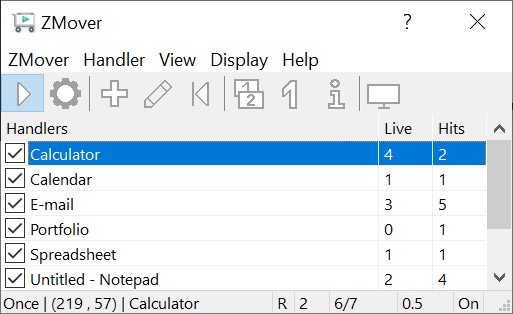
Main window
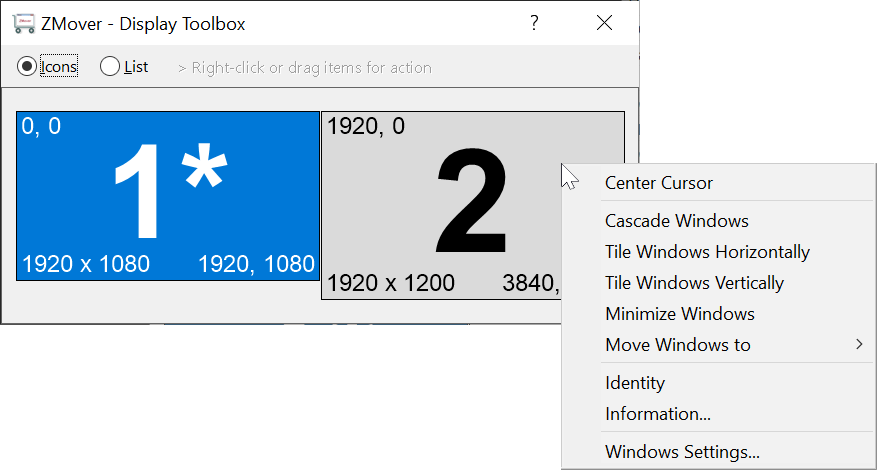
Toolbox window
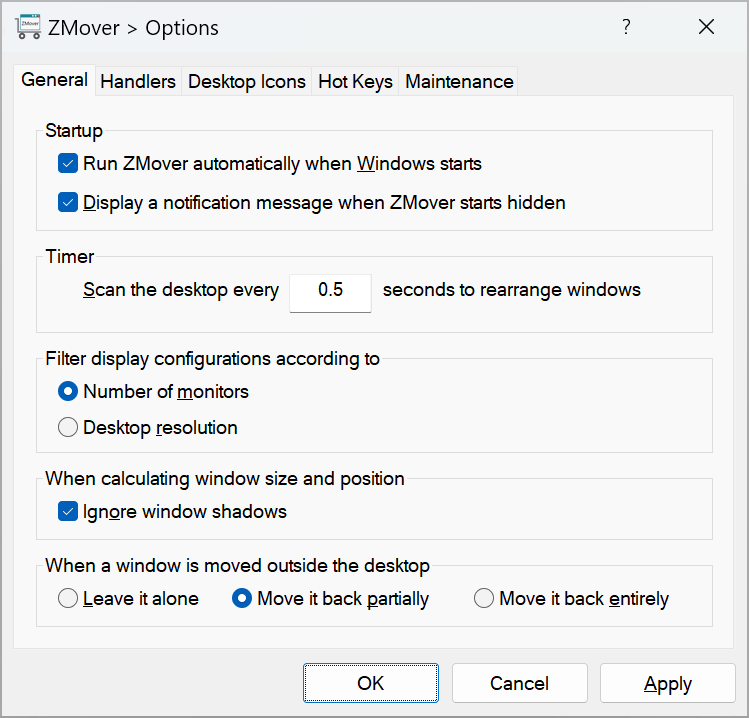
Options window
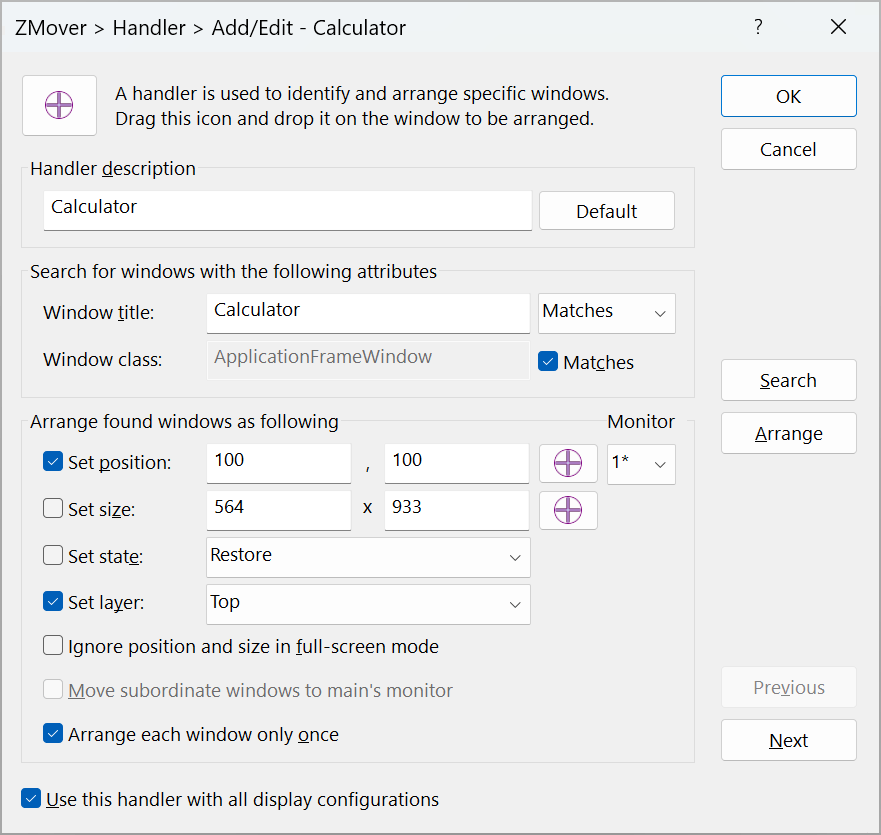
Window handler properties
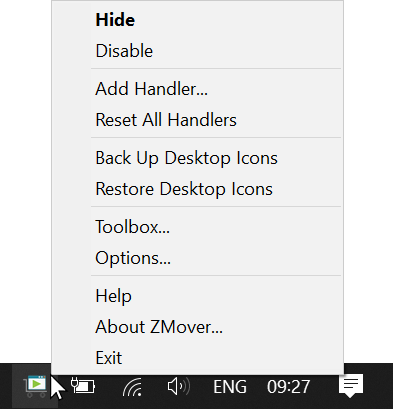
Taskbar corner icon menu
- Control the position, size, and layering of any window.
- Save and restore window layouts across multiple monitors and display configurations.
- Save and restore desktop icon positions across multiple monitors and display configurations.
- Move and arrange windows easily on multiple monitors.
- Prevent Windows from moving desktop icons around.
- Detect display configuration changes and apply saved profiles on the fly.
- Define hot keys to trigger actions instantly.
- Easy drag and drop user interface.
- Works in the background and doesn't waste desktop space.
- Technical specifications.
Version 8.24 on 2024-06-19
- Added an option to exclude shadows from window measurements.
- Performed stability and performance improvements.
Version 8.23 on 2023-10-02
- Performed stability and performance improvements.
- Discontinued Windows Vista and Server 2008 R1 compatibility to take advantage of newer Windows features. You can download v8.13 to run ZMover on Windows Vista/Server 2008 R1. The new minimum is Windows 7/Server 2008 R2.
Version 8.13 on 2021-10-05
- Added the Activate state option to activate targeted windows and bring them to the foreground.
- Fine-tuned the taskbar notification area icon interface.
Version 8.12 on 2021-08-12
- Updated the taskbar notification area icon interface.
- Maintained scrolling position after deleting a handler in the main window.
- Sorted handlers in the Options window to find them more easily.
- Added the ability to Check/Clear All boxes in the Add All window using Ctrl+click.
- Added window class name matching to handler default settings.
- Ignored Akamai's Steam popup menus.
Version 8.11 on 2021-02-01
- Maintenance release.
Version 8.1 on 2020-05-18
- Fixed a bug causing the Configure Updates window to hang occasionally.
Version 8.0 on 2020-02-27
- Added support for resolution-based display configuration profiles. Before, profiles depended only on the number of monitors. This feature is available in Options > General.
- Improved display detection and added Menu > Display > Redetect Settings to help troubleshoot faulty drivers and system malfunctions.
- Improved window detection and filtered out additional irrelevant hidden system windows.
- Upgraded the user interface and help guide.
- Beefed up data collected in the Display Information window.
- Changed the default setting of new handlers so they apply only to the current display configuration.
- Reset handlers when the display configuration changes if they apply to both the old and new configuration.
- Discontinued Windows XP and Server 2003 compatibility to take advantage of newer Windows features. You can download v7.79 to run ZMover on Windows XP/2003. The new minimum is Windows Vista and Server 2008.
- This version includes major enhancements. Licensees using older versions of ZMover can upgrade to 8.0 at a discounted price, or free of charge if the licenses where purchased within 30 days of this release date.
Version 7.79 on 2018-07-23
- Added the /Enable and /Disable command line parameters and fixed /ResetAll.
Version 7.78 on 2018-04-18
- Accommodated the Windows 10 Improved Boot Up Experience feature.
Version 7.77 on 2017-06-09
- Fixed a bug causing the Toolbox to be empty when the desktop is extended to external monitors that are not physically plugged in.
Version 7.76 on 2016-02-18
- Maintenance release.
Version 7.71 on 2015-04-20
- Fixed the "Ignore resizing on full screen" handler property.
Version 7.70 on 2014-05-01
- Resolved a Microsoft Office 2013 issue occurring when Outlook and Word handlers are simultaneously active.
- Eliminated confirmation messages after backing up and restoring desktop icons.
Version 7.63 on 2013-07-10
- Fixed the handling of Microsoft Office applications.
- Added a desktop icons backup item to the taskbar notification area icon menu.
Version 7.62 on 2013-06-25
- Updated the software for Windows XP/2003 backward compatibility.
Version 7.6 on 2013-05-24
- Performed a Windows 8 compatibility update.
Version 7.5 on 2012-09-11
- Added the ability to filter windows by class name only.
- Added a Reset All Handlers hot key.
- Modified the behavior of the Handler description Default button in the Window Handler window.
- Initialized the monitor number to the current window position in the Window Handler window.
Version 7.4a on 2012-04-26
- Fixed: captured window position may be incorrect when the taskbar is docked on the left.
- Fixed: handlers sorting order is not restored from previous session.
Version 7.4 on 2011-11-30
- Added to the Toolbox context menu a command to move all windows to the right-clicked monitor.
- Added to the taskbar notification area icon menu a shortcut to restore desktop icons.
Version 7.3 on 2011-07-15
- Added a configurable updater to keep the program up to date.
- Improved the Options window interface.
- Improved the installer.
Version 7.2 on 2011-02-07
- Added the ability to automatically create handlers for all opened applications.
Version 7.1 on 2010-03-08
- Added the ability to automatically arrange desktop icons whenever the display configuration changes.
- Prevented ZMover windows from opening outside the desktop, which could occur in earlier versions after reducing the display resolution.
- Added work/total monitor area to the Display Information window.
- Stopped listing undefined hot keys in the startup notification message.
- Fixed: in some cases, disabling ZMover wouldn't stop desktop scanning.
- Fixed: in some cases, the display resolution was incorrectly reported in the Handlers Options section.
Version 7.0 on 2010-01-23
- Updated the software for Windows 7 compatibility.
- Created a 64-bit version of the software and updated the installer to include both 32-bit and 64-bit versions. The installer will automatically select the version matching your system.
- Added the ability to selectively associate window handlers with different monitor configurations. This enables you to choose with which monitor configuration a handler will be active.
- Added the ability to define a different handler targeting the same windows for each monitor configuration. This enables you to rearrange the same window differently depending on the monitor configuration.
- Added the ability to back up and restore the program data file containing user settings and handlers.
-
Added a display toolbox to let you:
- View your configuration graphically and textually.
- Arrange windows on any monitor.
- Move windows from any monitor to another.
- Save and restore desktop icons.
- Invoke commands using hot keys.
- Move the cursor between monitors using a hot key.
- Show detailed display information.
- Display monitor identity on any monitor.
- Added window class name filtering to window identification.
- Added options to handle windows moved outside the desktop.
- Tweaked the program to enable a window initially minimized/maximized, to be minimized/maximized on a different monitor.
- Overhauled the user interface.
- Licensees using older versions of the product can upgrade to this major 7.0 update at a discounted price.
Version 6.0 on 2007-11-15
- Updated the software to comply with Vista requirements. Previously, the program and its installer ran on Vista in compatibility mode. Now, they run on Vista in native mode, comply with UAC and other Vista technologies, and are digitally signed with an Authenticode certificate to ensure their integrity and authenticity. These major enhancements provide a better and safer experience when running the software on all supported Windows versions.
- Redesigned the application to use the Unicode standard and improve its Windows integration and multilingual support.
- Redesigned the installer to use Microsoft MSI technology and comply with recent Windows guidelines.
- Redesigned the help guide.
- Discontinued Windows 98 and Me compatibility to take better advantage of new Windows features.
- Upgrading to this major 6.0 update requires a licensing fee for existing customers who are licensed to use older versions.
Version 5.5 on 2006-05-30
- Added a multiple monitor desktop option to move subwindows to their parent's monitor.
- Added a Hits column context menu item to reset all hit counters.
- Added clicking options to disable, enable or toggle all handlers.
- Added the ability to resize the main window.
- Displayed a taskbar notification message when ZMover starts hidden.
- Added Unicode support to improve multilingual text handling.
- Discontinued Windows 98 and Me compatibility to take better advantage of new Windows features.
Version 5.0 on 2005-03-28
- Revamped the user interface.
- Revamped the help guide.
- Made the [X] button in the window title bar hide ZMover instead of closing it.
-
Enhanced the window handler list by adding the following
features:
- A column displaying the number of windows currently displayed on the desktop.
- A column displaying the number of windows that have been rearranged.
- Context-sensitive right-click menus to edit handler properties.
- Handler sorting by column to organize the list.
- Added shortcut keys to the taskbar notification area icon to enable/disable ZMover and reset window handlers.
- Added a switch to run ZMover when Windows starts.
- Extended the window centering feature to cover auxiliary monitors.
- Added an option to help locate targeted windows.
- Upgrading to this major 5.0 update requires a licensing fee for existing customers who are licensed to use older versions.
...
Version 1.0 on 1996-09-01
- Initial release.
The following older versions are available to licensees for downloading: